ncurses terminfo parameter expansion can simulate 2-counter Minsky machines.
Host a parasitic Fibonacci program in your terminal, clocked by /usr/bin/top.
2nd October 2026
Back in 2019, Gwen Weinholt (weinholt.se) noticed that Terminfo featured a stack machine with parameters, arithmetic and logic, if-then-else, output, and persistent variables. Gwen noted that terminfo was close to a Turing machine but lacked loops, which could be worked around by pushing the iteration outside the language.
More recently, Martin Tournoij implemented the Go termfo package and noted that "terminfo files are Turing-complete".
This article builds on these observations and makes the universality argument explicit with a reduction from two-counter Minsky machines.
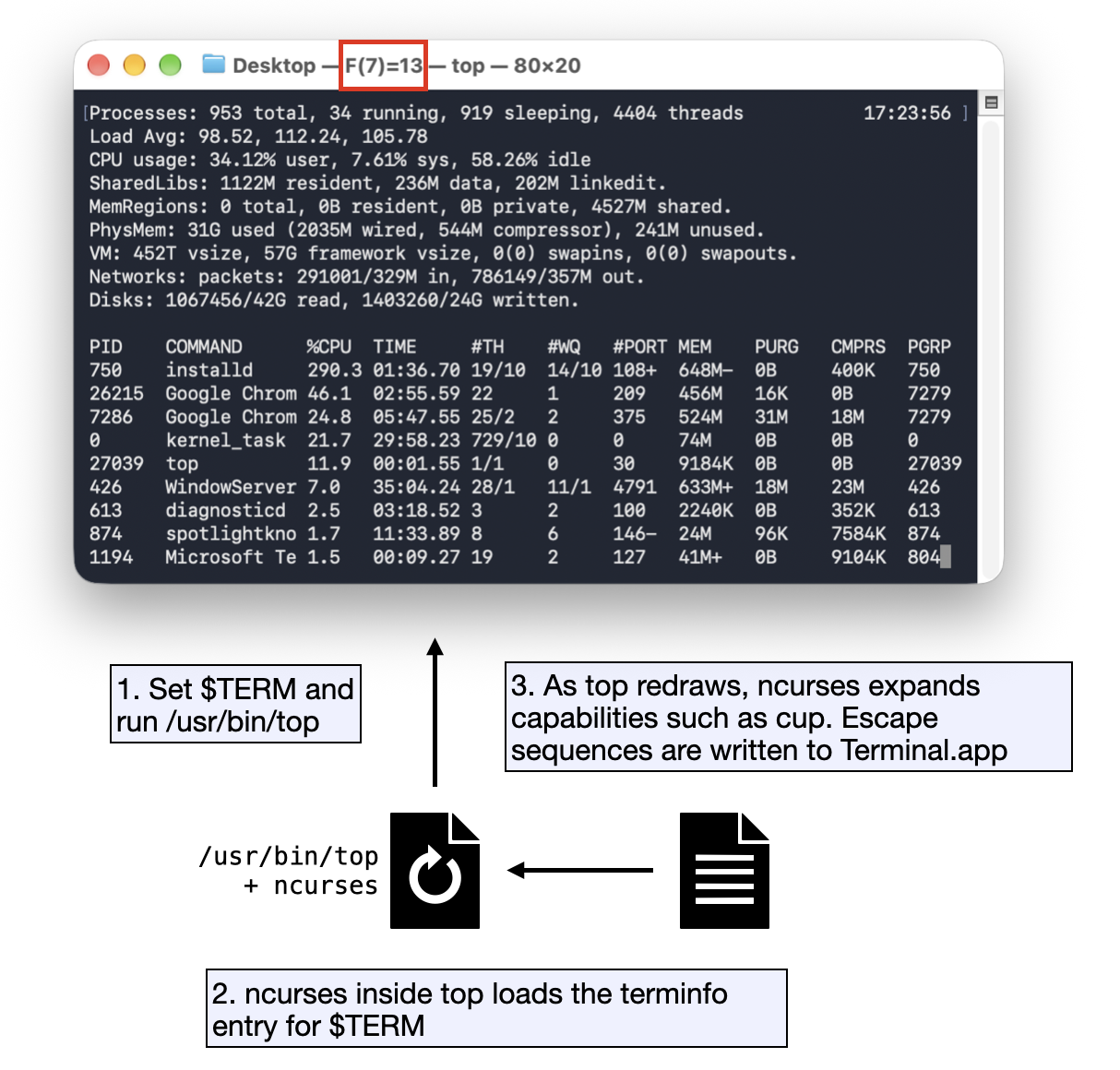
Early physical terminals used various escape sequences to move cursor, delete characters, write in bold or colors, etc. Terminal applications need to know which escape sequences a terminal understands. The $TERM environment variable names a terminal type, and the terminfo database describes its capabilities. The database is actually a set of compiled keys and values, usually stored in /usr/share/terminfo.
A typical macOS Terminal profile declares TERM=xterm-256color. Running infocmp xterm-256color shows, among other capabilities: cup=\E[%i%p1%d;%p2%dH. cup is the key used for cursor addressing. Curses supplies zero-based row and column arguments, and %i increments the first two parameters, because the terminal escape sequence uses one-based coordinates.
The language is briefly presented in ncurses/tinfo/lib_tparm.c. Relevant bits for this article:
| Instruction | Meaning |
|---|---|
%{n} |
push integer constant n |
%gX |
push register X |
%PX |
pop into register X |
%= %+ %- |
pop two, push equal / sum / subtraction |
%d |
pop and print |
%p1 %p2 |
push the row and column args passed to cup, counted from 0 |
%?c %t a %e b %; |
if c then a else b |
%? c1 %t a1 %e c2 %t a2 %e b %; |
if c1 then a1, else if c2 then a2, else b |
The language uses 26 uppercase and 26 lowercase registers (A-Z and a-z). Uppercase registers are the ones meant to persist across various expansions inside a single process.
The interesting part is that we can use our own terminal conventions and define what happens when, say, curses is moving the cursor. In the following example, we compile a terminal named test, with a cup rule that prints hello at row 5, col 30, before moving the cursor to the requested position.
test,cup=\E[5;30H hello \E[%i%p1%d;%p2%dH,
Compile and run with:
tic test.txt; TERM=test; tput cup 0 0
Note that, by default, tic commonly installs user entries under ~/.terminfo/. To compile and look them up in the current directory instead, use export TERMINFO="$PWD".
So, we have a small language with arithmetic, persistent state and conditional control flow. As noted in section 1, it lacks an internal loop. Only repeated capability expansion can provide a clock.
Let A and B be the two registers and Z the program counter.
An arbitrary instruction i: INC A -> j can be compiled as:
if Z == i:
    A = A+1
    Z = j
or in terminfo:
%?%gZ%{i}%=%t
    %gA%{1}%+%PA
    %{j}%PZ
Likewise, j: JZDEC A -> k, l becomes:
if Z == j:
    if A == 0:
        Z = k
    else:
        A = A-1
        Z = l
We can have a single if / else-if chain on Z, with one branch per instruction. Each expansion executes one machine step, and repeated expansions provide the clock.
This directly implements the instruction set of a two-counter Minsky machine. With idealized unbounded counters and capability size, the construction is computationally universal.
In practice, concrete ncurses implementations bound both register values and terminfo entry size, so any actual instance is finite-state.
Here is a small adding machine, easy to inspect and understand. The machine computes 4 + 9 = 13. Each expansion prints the current state to stdout, and the program does not emit the final cursor-move escape.
Minsky program:
0: A=4, B=9, Z=1  # initialization
1: JZDEC B,3,2    # if B is empty, halt
2: INC A,1        # move one unit from B into A
3: HALT           # halt
add,cup=

# if      (Z == 0) { A = 4; B = 9; Z = 1 }
    %?%gZ%{0}%=%t
        %{4}%PA
        %{9}%PB
        %{1}%PZ
# else if (Z == 1) { if (B == 0) { Z = 3 } else { B = B-1; Z = 2 } }
    %e%gZ%{1}%=%t
        %?%gB%{0}%=%t
            %{3}%PZ
        %e
            %gB%{1}%-%PB
            %{2}%PZ
        %;
# else if (Z == 2) { A = A + 1; Z = 1 }
    %e%gZ%{2}%=%t
        %gA%{1}%+%PA
        %{1}%PZ
# else if (Z == 3) { HALTED }
    %e%gZ%{3}%=%t
    %;
# print the trace after executing this expansion
    Z=%gZ%d A=%gA%d B=%gB%d\n,
Compile and run by expanding the rules 20 times (the number of expansions the machine needs before halting):
tic add.txt
TERM=add; yes 'cup 0 0' | head -n 20 | tput -S
Last line of output:
Z=3 A=13 B=0
As with the addition machine, we can build a Fibonacci machine using 3 registers:
A = F(N-1)
B = F(N)
N = current Fibonacci index, also used as initialization flag
fib,cup=
    %?%gN%{0}%=%t%{0}%PA%{1}%PB%{1}%PN
    %e%gA%gB%+%gB%PA%PB%gN%{1}%+%PN%;
    A=%gA%d B=%gB%d N=%gN%d F(%gN%d)=%gB%d\r\n,
These lines mean:
if (N == 0) {
    A = 0; B = 1; N = 1;
} else {
    stack: B' = A + B, A' = old B; N = N + 1;
}
print trace line
Compile and run with:
tic fib.txt
TERM=fib; yes 'cup 0 0' | head -n 10 | tput -S
So with head -n 10 the last line is:
A=34 B=55 N=10 F(10)=55
The previous machine is clocked by yes which emits the same line repeatedly.
An interesting variant is to have another program providing the clock, be redrawing the screen at regular intervals.
For instance, /usr/bin/top redraws its header clock each second. On my setup, this causes a cup(0,78) call when the seconds field is repainted. This very cursor movement can be used as a clock (a clock to clock...). The exact coordinate depends on the top layout and terminal size.
fib_top,cup=

# advance one step when top addresses the seconds digit at (0,78)
    %?%p1%{0}%=%p2%{78}%=%A%t\
       %?%gN%{0}%=%t\
          %{0}%PA%{1}%PB%{1}%PN\
       %e\
          %gA%gB%+%gB%PA%PB%gN%{1}%+%PN\
       %;\
    %;

# show the current result in the window title
    \E]0;F(%gN%d)=%gB%d\007

# emit the cursor move top requested
    \E[%p1%{1}%+%d;%p2%{1}%+%dH,
Compile and run with:
tic fib_top.txt
TERM=fib_top; /usr/bin/top
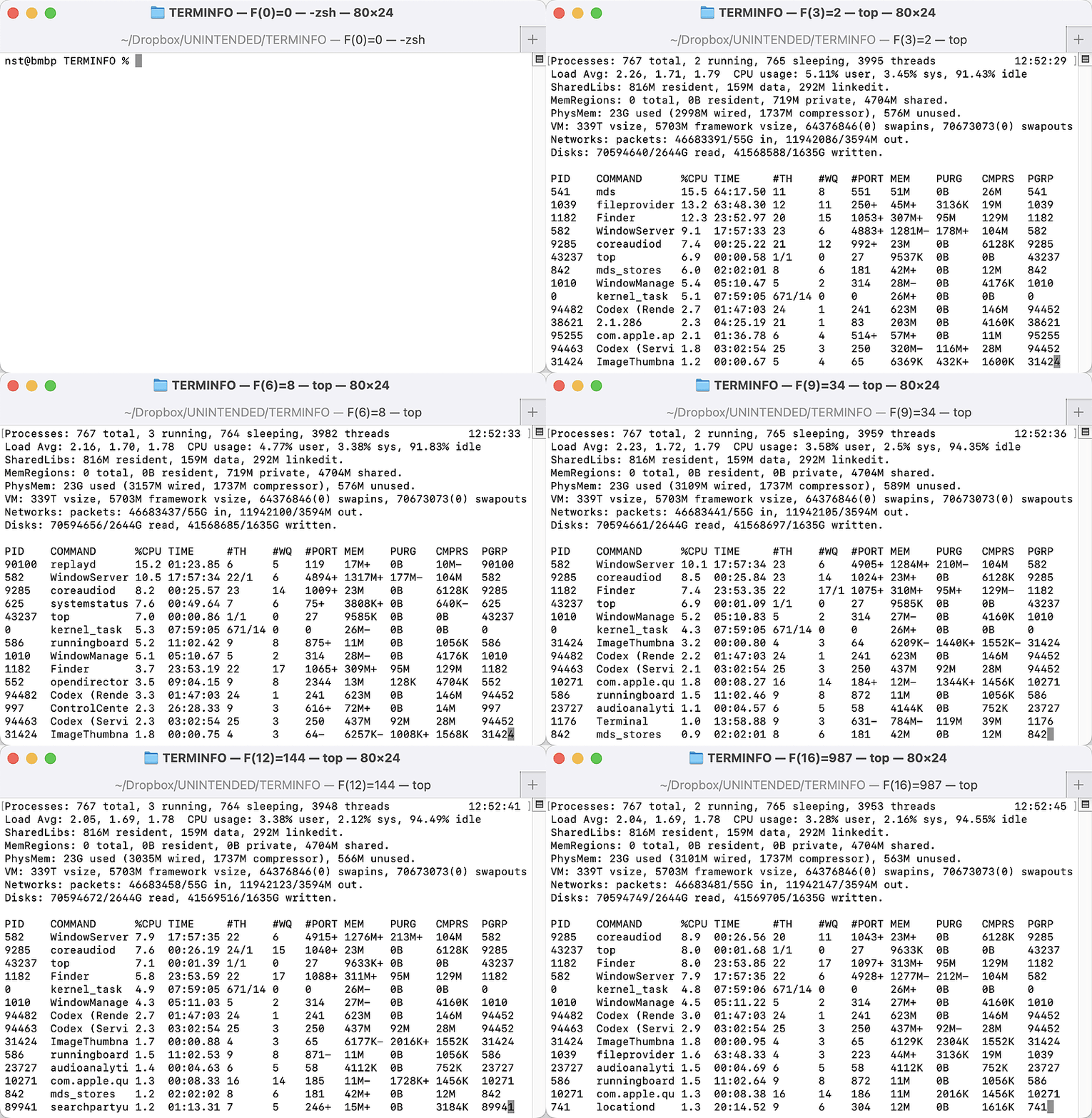
A parasitic Fibonacci program in your terminal, clocked by /usr/bin/top Output in window title.
Is it a bug? Nothing in the Fibonacci example needs to be broken. Arithmetic, conditionals, persistent variables, parameter expansion, and cursor addressing all behave as intended. The unexpected behavior emerges from their composition, which makes it a hack rather than a bug.
The interesting security property is the trust boundary: a user-controlled terminfo program is repeatedly interpreted by ncurses inside another process. But even when evaluated by a setuid-root program such as top, the Fibonacci program is not a privilege-escalation exploit. Terminfo parameter expansion cannot open files, execute commands, or issue syscalls.
By itself, the example only produces terminal output. Only a vulnerability in the terminfo parser or parameter evaluator in that privileged context could have a privileged impact.
This article demonstrates that: